Dashboard
Overview
The Shortlink overview shows your link analytics at a glance — how many people clicked, where they came from, what devices they used, and which links perform best.
Using Shortlink requires an active subscription with the Shortlink engine enabled. If your subscription expires, the module becomes read-only ("Renew to make changes").
When to use it
- You want a quick health check of all your links in one place.
- You're reporting on a campaign and need the headline numbers.
Before you start
- You need at least one short link created so there's data to show.
- Analytics fill in over time — a brand-new link may show little until people start clicking.
Step by step
-
Open Shortlink to land on the Overview dashboard.
-
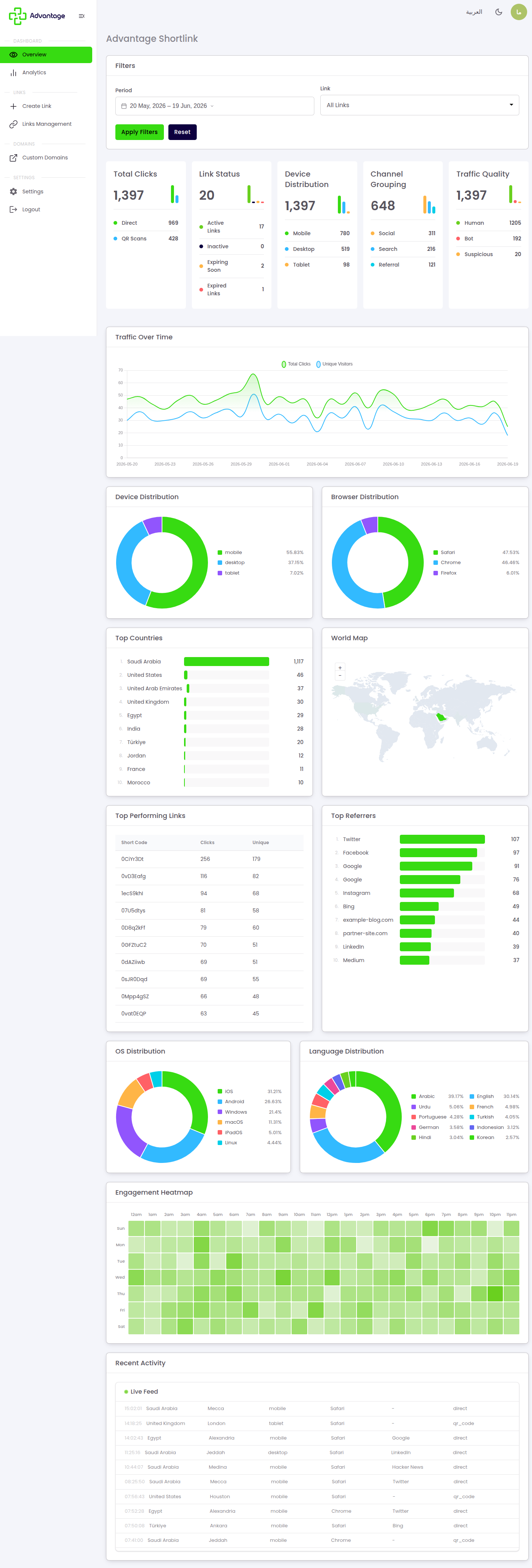
Read the KPI cards: Total Clicks (split into direct clicks vs QR scans), Link Status counts (active, inactive, expiring soon, expired), Device distribution, Channel grouping (six types: social, search, referral, email, direct, and other), and Traffic quality (human, bot, suspicious).
-
Scroll through the visuals: a clicks-over-time chart, pie charts for device, browser, OS, and language, Top countries, a world map, Top performing links, Top referrers, an engagement heatmap, and a live recent-activity feed.
-
Use the filters at the top — time period, by link, and by status — to narrow the data to what you care about.
Good to know
What's the difference between direct clicks and QR scans? Direct clicks come from someone tapping or opening the link. QR scans come from someone scanning the link's QR code. They're counted separately so you can measure online and offline reach apart.
What does "expiring soon" mean on the Link Status card? It counts links that are still active but close to their expiry date, so you can renew them before they stop working.
Why is the recent-activity feed useful? It updates live, so you can confirm a link is working the moment you share it.
Tips & pitfalls
Tip: Set the time period first — most cards and charts update to match the range you pick.
Warning: Very recent clicks may take a short time to appear, so the live feed can be slightly ahead of the totals.
Next steps
- Analytics — for a deeper tab-by-tab breakdown.
- Create a normal link — to add your first link.