Registration
Overview
Create your Advantage account with your name, email, organization, and a password.
When to use it
- You're new to Advantage and want to set up your own organization.
- You haven't been invited by an existing team and want to start fresh.
Before you start
- A valid email address you can access.
- If a teammate already invited you, you don't register here — you accept their invitation instead (see Organization & team).
Step by step
-
On the login page, choose Create an account. Fill in your first name, last name, email, organization name, and a password (twice). Tick I agree to privacy policy & terms, then choose Register.
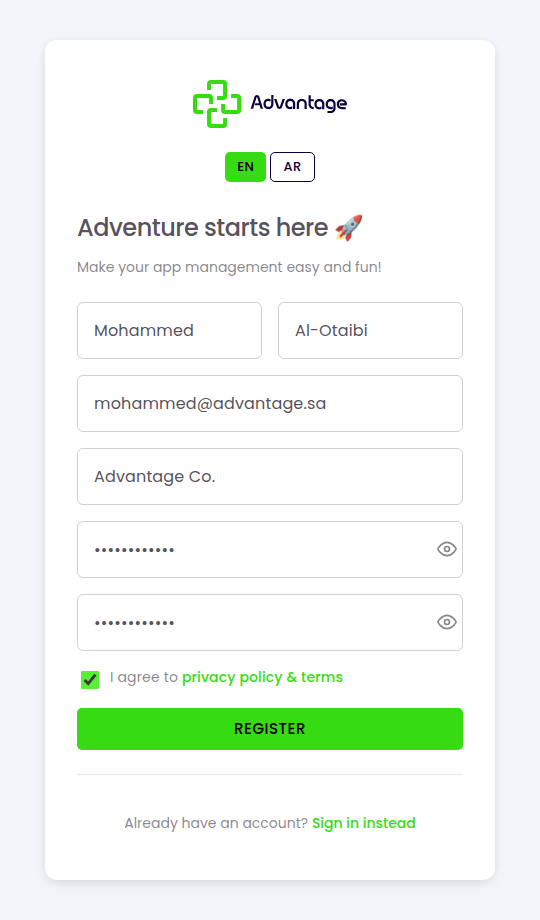
After you register, Advantage creates your organization and sends a confirmation message to your email. Open it and click the confirmation link to activate your account — you're then signed in automatically to the Overview dashboard. You can't sign in until you confirm your email.
Good to know
What is "Organization"? It's the name of your company or workspace. Your links, surveys, team members, and subscription all live under this organization.
What are the password rules? Use at least 8 characters mixing letters and numbers. The longer and more unique, the safer.
I was invited by my company — should I register here? No. Use the invitation link in your email to join their organization, so you share their workspace and plan. Registering here would create a separate organization.
What if the email or organization name is already taken? If the email belongs to an existing account, or the organization name is taken, you'll see an error on the form. Use a different email, choose a different organization name, or sign in if you already have an account.
Do I need to confirm my email? Yes. After you register we send a confirmation message with a link to your email. Open it and click the link to confirm your address — your account is then activated and you're signed in automatically. You can't sign in until you confirm. The link is valid for about 3 days; if it doesn't arrive or has expired, request a new one from the login page (and check your spam folder).
Tips & pitfalls
Tip: Use your work email so teammates can recognize and invite you.
Warning: The organization name is how your workspace is identified — pick your real company name, not a test value.
Next steps
Once your account exists, invite colleagues from Organization & team.