What Advantage is
Overview
Advantage is a Saudi marketing-technology platform that helps businesses build stronger customer relationships through data-driven solutions. Our motto — "Driven by Data, Fueled by Passion" — means your decisions come from real data, not guesswork.
It brings several marketing tools together under one account, with your data hosted inside Saudi Arabia and compliant with the Personal Data Protection Law (PDPL) and National Information Center (NIC) standards. After you sign in, the Overview is your home base for opening each tool and seeing recent activity.
Advantage's services
The platform is made up of four services — subscribe to only the ones you need:
- Shortlink — available now. Create branded short links, QR codes that track every scan and click, and smart links that route visitors by device, location, or language, with real-time analytics on clicks, devices, and locations, a UTM builder, bulk upload, and custom domains. See the Shortlink guide.
- Survey — available now. Capture customer feedback at the right moments with brand-aligned surveys, measure satisfaction and loyalty with CSAT, NPS, and CES, and turn feedback into actions that improve your service. See the Survey guide.
- Measurement — coming soon. Mobile app performance measurement, install/attribution tracking, and analytics.
- Engagement — coming soon. Reach customers across multiple channels with personalized journeys and marketing automation.
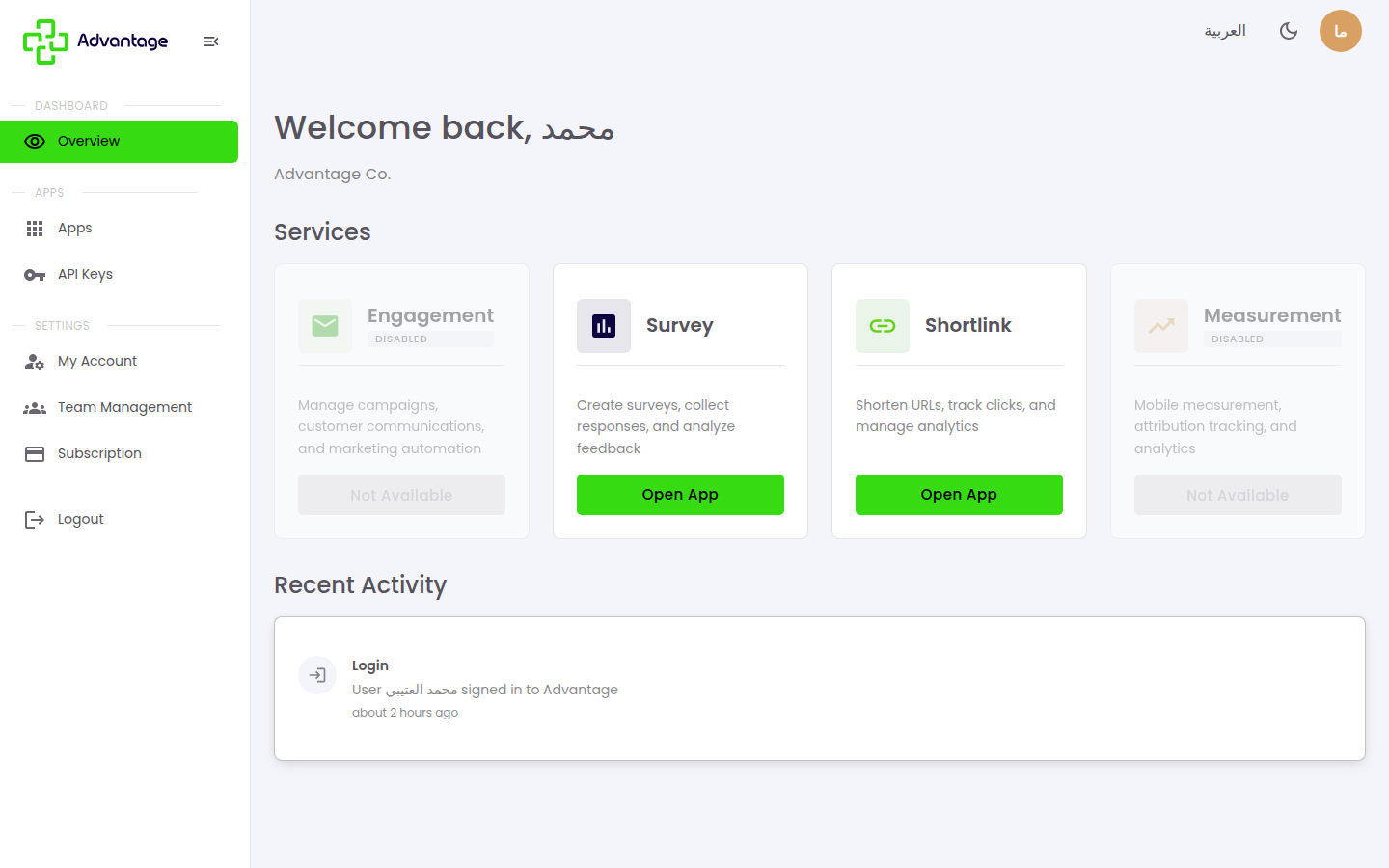
Services that aren't in your plan — or that haven't launched yet — appear with a Disabled badge and a Not Available button.
When to use it
- It's the first screen you see after logging in — your starting point each visit.
- You want to jump between tools (for example, from your short links to your surveys) without logging in again.
Before you start
- You need to be signed in. See Logging in.
Step by step
-
After you sign in, you arrive at the Overview. Each card is a module (tool). Cards that are included in your plan and enabled show an Open App button — choose it to enter that tool. Cards that are disabled show a Disabled badge and a Not Available button (instead of the normal "Open App" button). Use the menu on the side to reach your settings, team, and subscription, and the top bar to switch language or theme.
Good to know
What is a "module"? A module is one of Advantage's tools — for example Shortlink (short links and QR codes) or Survey (forms and feedback). You only see and pay for the ones you need.
Why does a module show a "Disabled" badge or a "Not Available" button? For one of three reasons:
- Your current plan doesn't include that tool — you can add it from the Subscription & billing page.
- An admin turned that tool off for your account specifically (a per-user enable toggle).
- An admin set your account to inactive.
For the last two, contact your organization owner or admin.
What's in the side menu? Your account areas: profile, team management, and subscription & billing. The exact items depend on your role.
What does "Recent Activity" show? A short history of important actions on your account, such as sign-ins.
Tips & pitfalls
Tip: Switch the whole interface between Arabic and English, or light and dark, from the controls in the top bar — your choice follows you across every module.
Warning: If a tool you expected is missing, check your plan on the Subscription & billing page or ask your organization admin — access is set per plan, per role, and per the tool being enabled for your account.
Next steps
Start with Logging in to reach the Overview and open your modules.